Default IP Address List for Routers (Updated 2026)
Every Wi-Fi router comes with a small “doorway” address — a default IP that opens the admin panel where you manage everything: Wi-Fi name, password, parental controls, and firmware updates.
The problem? Most users forget or don’t know this IP. So here’s a clear, updated list of default router IP addresses for every major brand, written in simple language to help you connect quickly and safely.
What Exactly Is a Default IP Address?
A default IP address is like your router’s “home address” on your local network. When you type it in your browser’s address bar (for example, http://192.168.0.1), it takes you to the router’s login page.
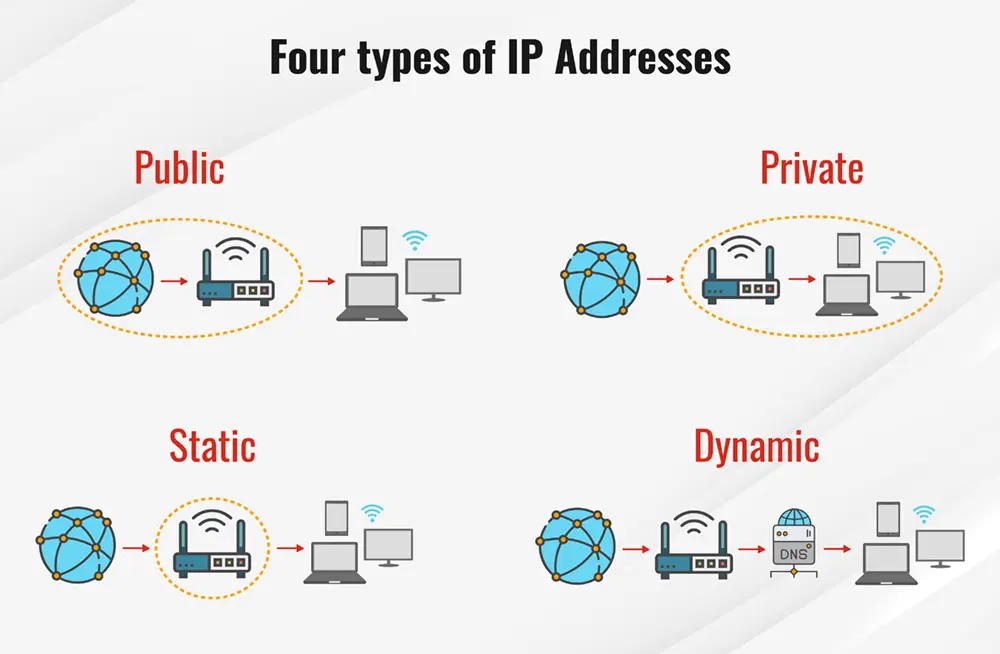
There you can enter the admin username and password and access all network settings — from Wi-Fi signal control to firmware updates.
Why You Should Know Your Router IP
Knowing your router’s IP isn’t just for tech experts. It helps you:
- 🔐 Secure your home network by changing the default password
- 🌐 Set up a new internet connection quickly
- 🚀 Boost speed by adjusting signal channels
- ⚙️ Update firmware to fix bugs and improve stability
- 📱 Manage devices connected to your Wi-Fi
How to Find Your Router IP Manually
If none of the default IPs work, here’s how you can find it yourself:
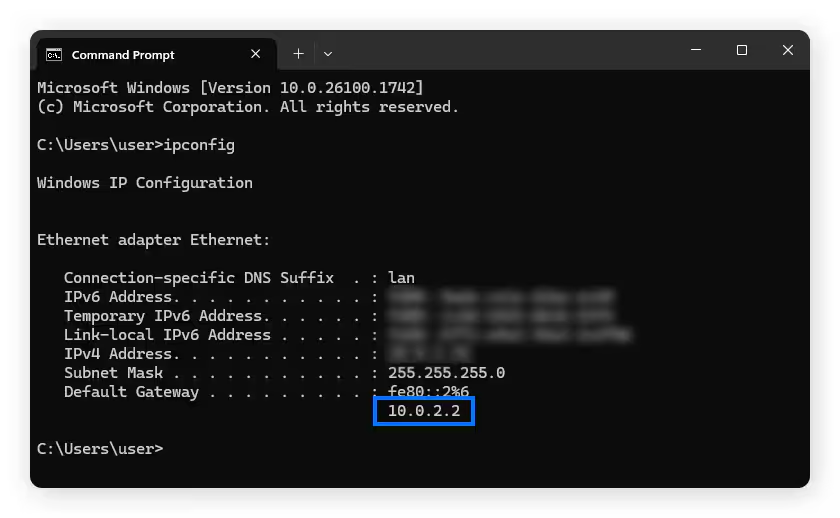
On Windows
- Press Windows + R → type
cmd→ Enter - Type
ipconfig - Check “Default Gateway” — that’s your router IP
On Mac
- Go to System Settings → Network
- Select your Wi-Fi → Advanced → TCP/IP tab
- The “Router” line shows the IP
On Mobile
- Open Wi-Fi Settings
- Tap your connected network
- Scroll to “Gateway” or “Router IP”
Complete List of Default Router IP Addresses (2026)
Below is the verified and updated list for each brand.
| Router Brand | Default Login IP / URL |
|---|---|
| D-Link | 192.168.0.1 / 192.168.1.1 / 192.168.10.1 / 192.168.0.50 / dlinkrouter.local |
| TP-Link | 192.168.1.1 / 192.168.0.1 / 192.168.0.254 / tplinkwifi.net / tplogin.cn |
| Netgear | 192.168.1.1 / 192.168.0.1 / routerlogin.net / 10.0.0.138 / 192.168.1.254 |
| ASUS | 192.168.1.1 / 192.168.50.1 / router.asus.com / 192.168.29.1 |
| Linksys | 192.168.1.1 / 192.168.0.1 / 192.168.15.1 / 192.168.16.1 |
| Belkin | 192.168.2.1 / 10.1.1.1 |
| ZyXEL | 192.168.1.1 / 192.168.10.1 / 192.168.100.1 / 192.168.200.1 |
| TRENDnet | 192.168.10.1 / 192.168.1.1 / 192.168.0.1 |
| Tenda | 192.168.0.1 / 192.168.1.1 / 192.168.2.1 |
| Buffalo | 192.168.11.1 / 192.168.13.1 / 192.168.1.1 |
| Edimax | 192.168.2.1 / 192.168.1.1 |
| Sagemcom | 192.168.1.1 / 192.168.1.254 / 192.168.0.1 |
| SMC | 192.168.2.1 / 192.168.0.1 / 10.0.0.1 |
| Arris | 192.168.0.1 / 192.168.1.254 / 192.168.100.1 / 10.0.0.1 |
| Actiontec | 192.168.0.1 / 192.168.1.1 / 192.168.254.254 |
| LevelOne | 192.168.0.1 / 192.168.1.1 / 192.168.123.254 |
| Huawei | 192.168.1.1 / 192.168.3.1 / 192.168.0.1 |
| EnGenius | 192.168.0.1 / 192.168.1.1 |
| Cisco | 192.168.1.1 / 10.0.0.1 / my.meraki.com |
| Technicolor | 10.0.0.1 / 192.168.0.1 / 192.168.1.1 / 192.168.1.254 |
If the Login Page Does Not Load
Sometimes typing the IP doesn’t open the page. Try these fixes:
- Make sure you’re connected to the router (Wi-Fi or LAN).
- Type it with http:// — for example
http://192.168.0.1. - Use another browser like Chrome or Edge.
- Temporarily disable VPN or proxy if active.
- If still not working, reset the router (gently press the reset pin for 10–15 seconds).
Default Login Credentials for Popular Routers
| Brand | Username | Password |
|---|---|---|
| D-Link | admin | admin |
| TP-Link | admin | admin |
| Netgear | admin | password |
| Linksys | admin | admin |
| ASUS | admin | admin |
| Huawei | admin | admin |
| Cisco | admin | cisco |
Tip: After your first login, always change the default password to protect your network from unauthorized access.
Security Tips for Router Users in 2026
- Use a strong password with letters, numbers and symbols.
- Keep your firmware up to date to patch vulnerabilities.
- Turn off remote management unless you really need it.
- Set up a guest Wi-Fi for visitors to protect your main network.
- Check connected devices regularly to block unknown users.
FAQs
1. How do I know which IP is correct for my router?
Look under your router — the IP and login details are usually printed on a label.
2. Can I change my router’s default IP?
Yes. You can change it in LAN settings, but remember the new address to avoid losing access.
3. What if I forget my admin password?
Reset the router to factory settings and then log in with the default credentials.
Yes. They’re private addresses used only inside your local network — not on the internet.
Final Thoughts
Knowing your router’s default IP address gives you complete control over your Wi-Fi network. With the table above, you can instantly find your router’s login page — whether it’s D-Link, TP-Link, Netgear or Huawei.
Manage your settings, boost security, and keep your connection running smoothly without calling a technician.